Last updated: November 18, 2026
Quick Answer: most printers stay predictable when you match the consumable to the printer type and follow a simple maintenance rhythm. Printer maintenance and consumables — The Complete Guide is mostly about preventing two expensive problems: bad print quality and surprise downtime. The right consumables, used on the right schedule, keep a printer predictable; the wrong ones can clog heads, smear pages, trigger error codes, and shorten the life of parts that are far more costly than a cartridge or a bottle of ink.
I write about office hardware and print workflows, so I know the difference between a cosmetic annoyance and a maintenance issue that will cost real money later. This guide to printer maintenance and consumables — The Complete Guide is for anyone trying to keep an inkjet or laser printer working reliably without overspending on supplies.
Key Takeaways
- Most printer failures are boring and preventable: dust, dried ink, worn rollers, low-quality paper, and overdue replacement parts.
- Consumables are not just ink or toner. They also include drums, waste-ink pads, maintenance boxes, fusers, rollers, and paper itself.
- The right maintenance schedule depends on printer type, duty cycle, and environment; a home printer and a 40-page-per-minute office laser need different care.
- Genuine vs. third-party consumables is a trade-off between cost and risk, not a simple good-versus-bad choice.
- If a printer is regularly clogging, jamming, or demanding frequent replacement parts, it may be cheaper to replace the device than keep feeding it.
What printer maintenance actually means
Printer maintenance means keeping the print path, paper path, and consumables within the limits the machine was designed for. That includes cleaning, replacing wear parts, using the right media, and changing consumables before they fail in service.
The important distinction is between routine care and corrective repair. Routine care is things like wiping dust from the exterior, running nozzle checks on an inkjet, or replacing a pickup roller. Corrective repair is what happens after a fault: a clogged head, a bad fuser, a cracked gear, or a toner leak. Routine care is cheaper, faster, and far less disruptive.
A generic article usually stops at “keep it clean.” That is too vague to be useful. A printer has several failure points, and each one behaves differently. Inkjet printers need protection against dried ink and idle time. Laser printers need attention to toner, paper dust, heat-related wear, and fuser life. Thermal printers have their own issue: dirty printheads and worn platen rollers. A maintenance plan that ignores the printer type is usually the wrong plan, and printer maintenance and consumables should be matched to the device.
The practical rule is simple: if the printer sits unused for weeks, think about printhead health; if it runs every day, think about feed rollers, toner handling, and dust control. That difference matters more than brand names.
Which consumables matter most, and why?
The consumable that matters most is the one tied to the printer’s imaging method. For an inkjet, that is ink. For a laser printer, it is toner. But that answer is incomplete, because the parts that fail after ink or toner often cost just as much attention.
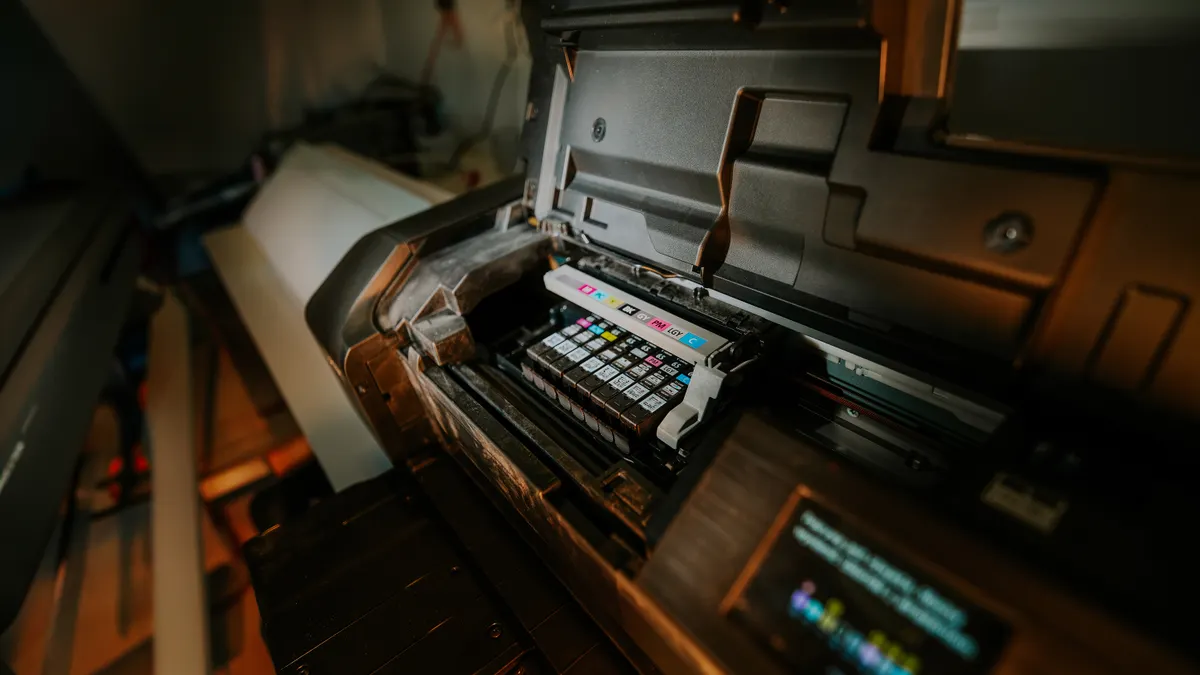
For inkjet printers, the usual consumables and wear items are:
- ink cartridges or refill bottles
- maintenance cartridges or waste-ink pads on some models
- printheads, when they are user-replaceable
- paper, especially coated photo paper and heavier stock
For laser printers, the consumables and wear items usually include:
- toner cartridges
- imaging drums, either built into the cartridge or separate
- waste-toner containers on some models
- fuser units
- transfer belts
- pickup rollers and separation pads
A lot of buyers focus only on the cartridge number. That is a mistake. An all-in-one inkjet with cheap-looking cartridges can become expensive if it uses a separate maintenance box that fills up quickly. A laser printer with an inexpensive toner cartridge can still become costly if the drum is separate and the printer has a short-rated fuser life. The listing often reveals this in the consumables table, not in the headline.
Paper counts as a consumable too, and it changes maintenance more than most people expect. Cheap, dusty, curled, or damp paper increases misfeeds and roller wear. A printer that jams only on one stack of paper is not “broken” in the same way; it is being fed the wrong stock.
One useful standard to look for is the ISO/IEC page-yield rating on toner and ink packaging. It gives a comparative figure for yield under standardized conditions, even though real-world coverage can vary. That figure is more useful than marketing language like “extra high capacity.” For related setup choices, see the guide to printer paper types, laser printer toner, and inkjet printer ink.
Inkjet maintenance: what keeps printheads alive
Inkjet maintenance is mostly about keeping ink moving. If ink dries in the nozzles or the printer sits too long, the result is streaking, missing colors, and cleaning cycles that waste more ink than a normal print job.
The first rule is to print something regularly. A small color test page once every week or two is often enough for a home inkjet that otherwise sits idle. The exact interval depends on the model and the room conditions, but the principle is the same: stagnation is the enemy. Dry air, heat, and long idle periods make clogging more likely.
The second rule is to use the printer’s own maintenance tools before problems get worse. A nozzle check, head cleaning, and head alignment are not optional features; they are part of the machine’s operating routine. If a light cleaning cycle restores the missing lines, that is a maintenance win. If the printer needs repeated deep cleanings, the issue is no longer routine. It may be a failing head, low-quality ink, or a machine that is not being used often enough for its design.
The third rule is to avoid mixed ink chemistry unless the maker explicitly allows it. Third-party inks vary in viscosity, dye composition, and pigment loading. Some work well; some create poor nozzle behavior or weak color accuracy. The risk is not abstract. A clog in an integrated printhead can turn an inexpensive ink purchase into a printer replacement conversation.
Here is the honest trade-off: genuine cartridges usually cost more, but they reduce uncertainty. Refilled or third-party ink can make sense when print volume is high and the printer is not especially expensive to service. It is a poor choice when the printer uses a delicate integrated head or when color fidelity matters more than page cost. For maintenance schedules, see how often to clean a printer and printer troubleshooting tips.
Laser printer maintenance: toner is only part of the story
Laser printer maintenance is about keeping heat, powder, and paper movement under control. Toner is dry, which means you do not get dried nozzles, but you do get dust, residue, and wear in the rollers and fuser.
The toner cartridge is only the visible consumable. A laser printer can also have a separate imaging drum, and that matters because drum wear shows up as repeating marks, faded areas, or ghosting long before the printer stops working altogether. If the drum and toner are separate, the printer may be cheap to feed with toner but expensive to keep over time. If the drum is built into the cartridge, replacement is simpler but cartridge prices tend to be higher.
Fuser maintenance is the part many users overlook. The fuser bonds toner to the page with heat and pressure, so it is a wear item. When it starts to fail, the symptoms are obvious: toner rubs off easily, pages curl more than usual, or the printer throws a fuser-related error. The specific rated life varies by model, and the printer’s service documentation is the source that matters here, not a general rule of thumb.
Laser printers also respond badly to poor paper. Very thin paper, dusty paper, and damp paper increase jam risk and can shed debris into the paper path. That debris lands on rollers and sensors, which creates the kind of intermittent fault that wastes time because it appears random.
For offices, a better maintenance habit is to track page counts and replace wear parts before the machine starts missing deadlines. For homes, a practical habit is to keep toner sealed, store spare cartridges flat and in a dry room, and run the printer often enough that the paper path does not sit unused for months. That approach usually works better than improvising after an error code appears. Related reading: printer repair vs replace and office printer maintenance.
Genuine, compatible, or refilled consumables?
Genuine consumables win when predictability matters most. Compatible and refilled consumables win when the budget matters most and the user accepts more variability.
That is the cleanest way to think about the choice. The right answer depends on the printer, the print volume, and the cost of failure. A cheap cartridge that leaks toner or produces poor color registration is not a bargain if it creates a service call or ruins a batch of client documents.
The safer place to use genuine supplies is in printers that are expensive to repair, under warranty, or important to color-critical work. That includes many photo inkjets and some office machines where the drum, fuser, or maintenance system is tightly integrated. The strongest case for compatibles is high-volume black-and-white printing where the user can tolerate some variation in output and is willing to accept a greater chance of a bad cartridge out of the box.
The drawback on both sides is real. Genuine supplies can be expensive and sometimes bundled in ways that force replacement before a part is fully used. Compatible supplies can vary in chip reliability, ink formulation, page yield, and packaging quality. Refilled cartridges can be especially variable if the refill process is poor or the cartridge body is already worn.
If the printer is mission-critical, caution matters more than chasing the lowest sticker price. If the printer is a backup machine or a high-volume text printer with no color requirements, the economics of compatible supplies become more attractive. For brand comparisons, see HP vs Brother printers and Epson vs Canon printers.
How do I know when a printer needs service instead of a new cartridge?
A printer needs service instead of a new cartridge when the symptom survives basic maintenance or appears in a pattern that points to a wear part, not a consumable. That distinction saves money.
The signs are practical:
- repeated paper jams in the same spot
- streaks or faded bands after a fresh cartridge
- toner or ink smearing after the page should be fully set
- repeated “replace maintenance box,” “drum end soon,” or similar warnings
- noise from rollers, gears, or the carriage that gets worse over time
- print quality problems that return immediately after cleaning cycles
A fresh cartridge is worth trying once if the current supply is near empty or known to be old. After that, repeated failure points to another part of the system. In inkjets, that can be a clogged head, a failed pump, or a full waste-ink system. In laser printers, it can be the drum, fuser, transfer belt, or feed mechanism.
This is where printer model numbers matter. Service documentation often lists replaceable parts and reset procedures that are not obvious from the front panel. If the manual gives a maintenance message tied to a specific counter, follow that counter. If the manual does not explain the fault and the problem repeats, the repair has moved beyond ordinary consumable replacement.
The blunt truth is that a low-cost printer can become uneconomical when one wear part costs nearly as much as the machine. That is especially true with compact home devices. A printer that has already gone through multiple cartridges, cleaning cycles, and feed issues may be telling you to stop maintaining it and replace it. The Consumer Reports printer buying guide and manufacturer service pages are useful starting points when the decision is between repair and replacement.
A head-to-head view of maintenance choices
The better choice is the one that matches the printer’s duty cycle and the cost of downtime. Here is the clean comparison.
| Criteria | Genuine consumables | Compatible or refilled consumables | Winner for this condition |
|---|---|---|---|
| Print reliability | Usually more consistent chip recognition and output quality | Can work well, but quality varies by maker and batch | Genuine, for critical jobs |
| Up-front cost | Higher in many cases | Usually lower | Compatible, for budget-driven printing |
| Warranty risk | Lower risk of supply-related disputes | Higher risk if the maker blames the supply | Genuine, for printers still under warranty |
| Color consistency | Better for photo and brand-sensitive output | May vary more across batches | Genuine, for color-critical work |
| Waste handling | Usually cleaner packaging and fewer leaks | Can be fine, but QC varies | Genuine, for clean office use |
| Best use case | Important documents, photos, office systems | High-volume text, secondary printers | Depends on job type |
| Service life of the printer | Less likely to create compatibility problems | Can be fine, but misfires happen more often | Genuine, for delicate devices |
| Best value over time | Good when downtime is expensive | Good when print volume is high and risk is tolerable | Compatible, for low-stakes volume |
| Troubleshooting simplicity | Easier to rule out the consumable | Harder to separate cartridge issues from printer issues | Genuine, for fast diagnosis |
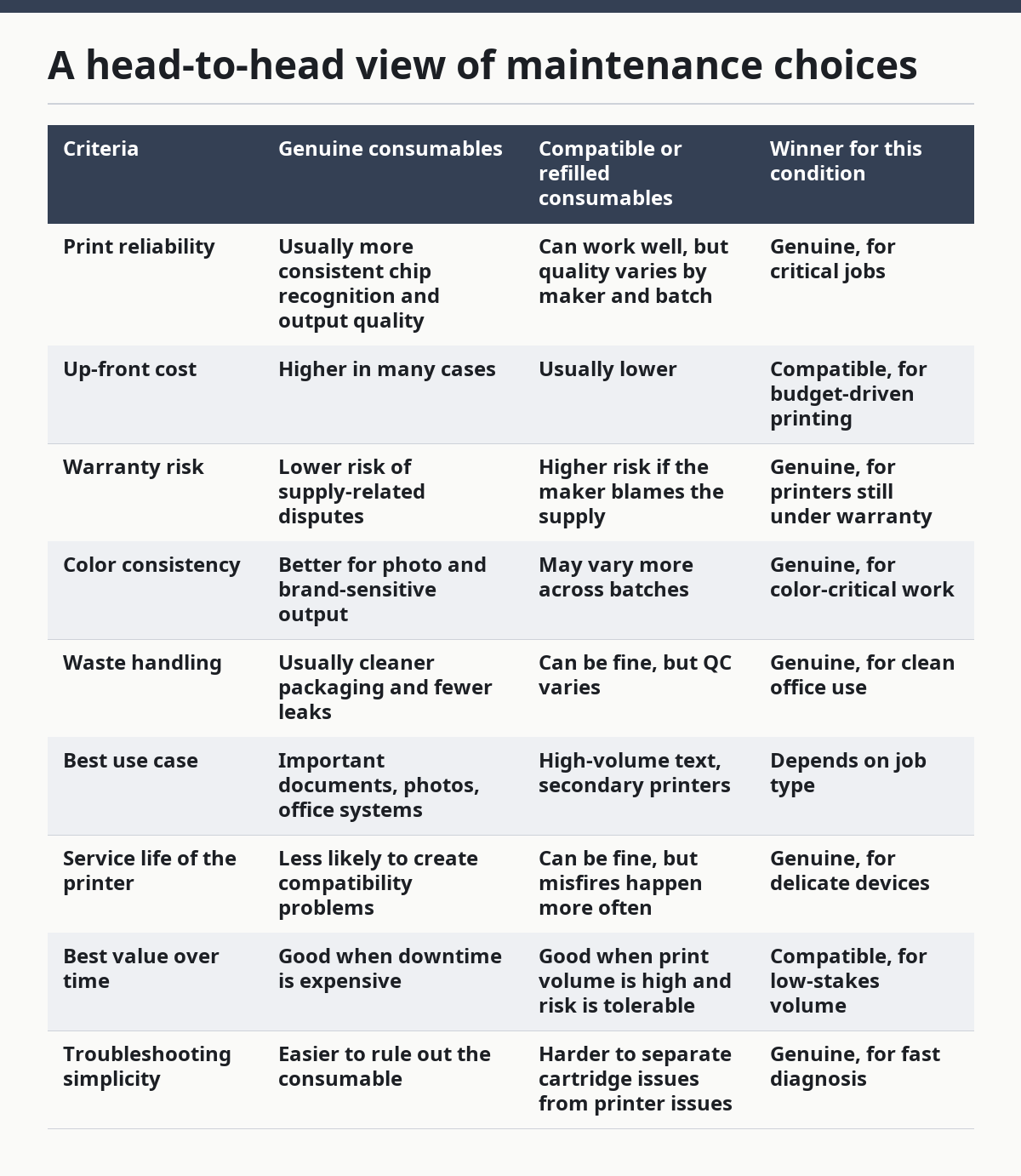
The table looks balanced because the decision really is conditional. The wrong move is treating all printers the same. A photo printer, a label printer, and a monochrome office laser do not deserve the same consumable strategy. For practical comparisons, see printer maintenance checklist and laser printer buying guide.
The strongest reason to pay more for genuine supplies is not brand loyalty; it is fewer unknowns. The strongest reason to choose compatibles is not thrift for its own sake; it is acceptable risk in a printer that would otherwise be too expensive to feed.
When should maintenance be scheduled, not improvised?
Maintenance should be scheduled when the printer sees regular use, when page counts are predictable, or when downtime would disrupt work. That is the difference between “clean it when it acts up” and a printer that stays usable for years.
A useful maintenance rhythm looks like this:
- weekly or biweekly: check paper supply, remove dust, run a quick test page if the printer is idle
- monthly: inspect rollers, clean exterior dust, verify alignment or nozzle health on inkjets
- every consumable change: check for leaks, worn contacts, loose paper fragments, and debris inside the tray area
- when print quality changes: do not wait for a total failure; diagnose the pattern right away
The specific interval depends on usage, temperature, humidity, and how the printer is stored. A printer in a dry room with infrequent use needs different care than a shared office printer that moves several hundred pages a week. The one thing that does not change is that waiting for a failure is the most expensive maintenance strategy, and printer maintenance and consumables work best when the schedule is set before problems start.
This is also where tracking matters. If a printer has a service menu or page counter, use it. The counter tells you when to expect a drum, fuser, maintenance kit, or waste-ink change. If the machine keeps its own maintenance log, read it. The message on the screen is often more valuable than a general online recommendation because it is tied to that exact model. For step-by-step upkeep, see printer maintenance checklist and how to clean a printer.
What the generic advice gets wrong
Generic advice usually gets three things wrong.
First, it treats ink and toner like the only consumables. That leaves out drums, maintenance boxes, waste ink systems, rollers, fusers, belts, and the paper itself.
Second, it assumes cleaning is always good. It is not. Over-cleaning an inkjet can waste ink and accelerate maintenance-parts consumption. Over-cleaning a laser printer without addressing the paper path can waste time and still leave the root problem untouched.
Third, it ignores printer type. A home inkjet used once a month should not be maintained like a shared office laser. A thermal label printer should not be treated like a color document printer. The wrong advice often sounds helpful because it is simple. Simplicity is not the same as accuracy.
If a printer manual mentions service intervals, part numbers, or maintenance counters, that is the most trustworthy source for that model. For broader rules about electronics care and supply handling, the manufacturer’s documentation should be read alongside standards and safety guidance from organizations such as ISO and the printer maker itself. When cleaning or handling toner, the safety data sheet is the authoritative document, not a forum post. For the consumable side, manufacturer guidance and standards bodies such as ISO are the right references for printer maintenance and consumables.
The verdict: what to do now
Choose genuine consumables if the printer is under warranty, handles important work, or has delicate integrated parts that are expensive to diagnose. Choose compatible or refilled consumables if the printer is high-volume, low-stakes, and inexpensive to replace, and you can tolerate more variability. Neither is the right choice if the printer already has repeated jams, recurring smear defects, or a worn fuser, because at that point the machine needs service or replacement, not another cartridge.
What should I replace first?
Replace the part that matches the symptom first, not the part that is easiest to buy. If the page is blank or streaky on an inkjet, start with nozzle checks and cartridge health. If the page is faded or repeating a mark on a laser printer, inspect toner, drum, and fuser indicators before buying random extras.
That order matters because maintenance should be diagnostic, not hopeful. A printer rarely fails all at once. It usually gives clues, and the clue is tied to a specific consumable or wear part. For example, a repeated vertical line on a laser page points to a drum or fuser issue more often than to the toner itself. A home inkjet that has sat unused for three weeks may only need a cleaning cycle; a printer that needs that cycle every day may need a deeper repair.
A good maintenance habit is to keep a record of what was replaced and when. Even a simple note with the date, model number, and part changed can reveal a pattern after two or three cycles. If the same error returns after a new consumable and a proper cleaning, the problem is not the consumable anymore.
How do I store printer consumables?
Store printer consumables in a cool, dry place, in their sealed packaging, and away from sunlight and heat. Toner cartridges should stay flat and protected from abrasion; ink cartridges should stay within the temperature range stated by the maker. Paper should remain dry and wrapped until use.
Storage mistakes create maintenance problems before the cartridge even enters the printer. Humidity makes paper curl and feed poorly. Heat can shorten ink life and make seals less reliable. Rough handling can damage cartridge contacts or leak toner. If supplies are stored in a garage, basement, or vehicle trunk, the risk rises fast.
The easiest rule is to treat consumables like precision parts, not office clutter. A cartridge that was stored badly may look fine and still cause poor print quality or a sensor fault. When in doubt, inspect the packaging, the contacts, and the print result before blaming the printer itself.
Is third-party ink or toner always bad?
Third-party ink or toner is not always bad, but it is always a trade-off. Some compatible supplies perform well enough for routine text printing, while others create recognition errors, leaks, or poor color consistency. The risk rises when the printer uses a complex chip system or when output quality matters.
The practical test is not “cheap or expensive.” It is “what does a failure cost here?” If a cartridge error can interrupt a client deadline, the safer choice is a genuine supply. If the printer is a spare unit for drafts and internal notes, a compatible supply may be acceptable. That distinction is more useful than any blanket rule.
Drafted with AI; not yet reviewed by a person.